

Account Tags for Brokers
Last Thursday your risk manager noticed an account that trades like a bot, and told the dealer. The dealer meant to remember. By Monday nobody could say why that login sat on somebody's private watch list, or whether anyone had actually looked at it.
Tags fix that kind of forgetting. A tag is a small coloured label on a trading account — HFT, Arbitrage, VIP, whatever your desk really says out loud — and from then on everyone who opens Brokerpilot sees it: in every table, on every account card, in every filter. No side spreadsheet. No "ask whoever flagged it".
- 1 labelshared by cards, tables, filters and trigger rules
- Shift + Clickto select a whole range of accounts at once
- CSVexport of exactly the view you are looking at
One Label, Visible Everywhere
The idea is almost boring, and that is the point. A tag is one object in the whole platform, not a note pinned to a single screen. Create it once and it shows up next to the login in account tables, on the account card, in the tag filters and in the trigger rules that pick accounts by tag.
Rename it or change its colour and the change lands everywhere at the same moment. Your rules keep working, too, because they point at the tag itself and not at its name. Call it "Arb" today and "Latency arb" next month. Nothing breaks.
- Next to every login
- On the account card
- In the tag filters
- Inside trigger rules
The Tags Page: Only the Accounts You Care About
Open Tags and you get one thing: the accounts that carry at least one tag. Untagged accounts never appear. That makes it a working list rather than a database dump, and in most desks it fits on a single screen.
-
Filters that save time
Narrow by trade server, by login (paste a dozen at once) or by tag. Pick several tags and you see accounts that have any of them, so "HFT or Arbitrage" is a single click. Found a combination you use every morning? Save it as a filter template.
-
Columns that tell the story
Login, group, net volume, equity, session PnL, total PnL, margin level, the latest comment and the tags themselves as coloured badges. The table starts with the biggest absolute total PnL on top, so whoever is earning or bleeding the most is the first thing you see. Reorder, resize or pin columns; the table remembers.
-
Straight to action
Click a login to open the account card. Block the account from its row. Change a tag in two clicks. Need the list elsewhere? Export it to CSV with exactly the columns you have visible.
Tag Three Hundred Accounts Before the Coffee Gets Cold
Bulk tagging is where the page earns its keep. It is also built so that a slip of the mouse does not wreck anything.
- Tick the accounts. Hold Shift and click to grab a range, or use the header checkbox to take everything currently shown.
- Press Tag accounts, then choose which tags to add and which to remove. A tag cannot sit in both lists, so you cannot contradict yourself.
- Read the action summary before anything changes. It tells you how many accounts will really be updated and how many already have the tag and will be left alone.
- Hit Update. The table reloads and a message confirms the result, for example "Added: HFT, accounts: 12 · Removed: VIP, accounts: 3".
Only eligible accounts are touched, and tags you did not pick stay exactly where they were.
Tags That Actually Do Something
- Rules by tag. Event triggers can select accounts by tag, so "alert me only about VIP accounts" is a rule instead of a habit.
- Tag a whole group. Put a tag on a trading group and every account in it counts as tagged for filters and rules.
- Tag where the work happens. When an alert fires, say a latency arbitrage hit, you can tag the account from the notification window. It is also one click away on the account information page.
- Same words in sales and dealing. Tags can sync with your CRM, and the tagging your bridge already does shows up in Brokerpilot with very little setup.
How Desks Use Them
-
The dealer, 14:07
An alert comes in. Two clicks later the account carries HFT, and the next dealer on shift knows what it is and why, without reading a chat history.
-
The risk manager, Monday
Filter by Arbitrage on one server, glance at session PnL, export the list to CSV and bring it to the risk committee. Five minutes, no copy-pasting.
-
Compliance, any day
The latest comment sits in the same row as the tag, so the "why" travels with the label. Accounts under review stay visible until somebody removes the tag.
Small Print We Would Tell a Colleague
- Every tag gets its own colour, out of 16 presets. Keep the vocabulary short. A dozen labels people remember beat a hundred nobody uses.
- Deleting a tag is instant. It disappears from every account and group at once, with no confirmation. If you only want a different look, rename or recolour it instead.
- Names are up to 30 characters, and nothing stops two tags from sharing a name. Pick clear ones.
Tags Interface
Filters across the top, tagged accounts below, bulk actions one click away.
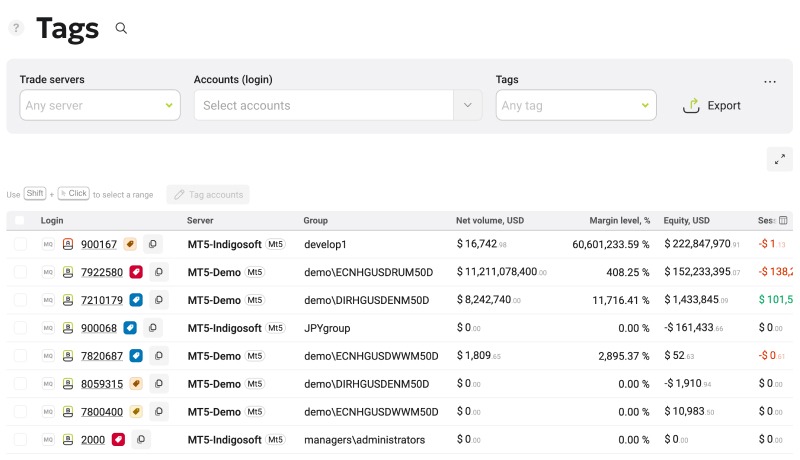
The Tags page
Questions About Tags
What are tags used for in Brokerpilot?
To mark accounts the way your desk talks about them: HFT, Arbitrage, VIP, under review. The mark then follows the account through tables, filters, alerts and trigger rules.
How many tags can I create?
Each tag takes one of 16 colour presets and no two tags share a colour, so the catalogue stays short by design. Free a colour by deleting or recolouring a tag before you add another.
Can I tag a whole trading group?
Yes. Accounts in a tagged group are treated as tagged for filtering and for trigger rules.
Can I get the list out of the platform?
Yes. Export gives you a CSV with the accounts that match your current filters and the columns you have visible.
Does renaming a tag break my rules?
No. Rules refer to the tag itself, so a rename or recolour is safe and applies everywhere.